
Civo cost dashboard for Mac.
Real charges from the Civo charges API. Period picker, projection, rate editor.
The Civo browser dashboard surfaces last-day costs at best. CivoCloudManager talks to the Civo charges API directly and renders the numbers in a native window, current month with a month-end projection, last month, last quarter, year to date, with per-resource breakdown and a rate editor for custom hourly rates. The runaway pod that burned €40 last week is the one you spot today, not the one you find in next month's invoice.
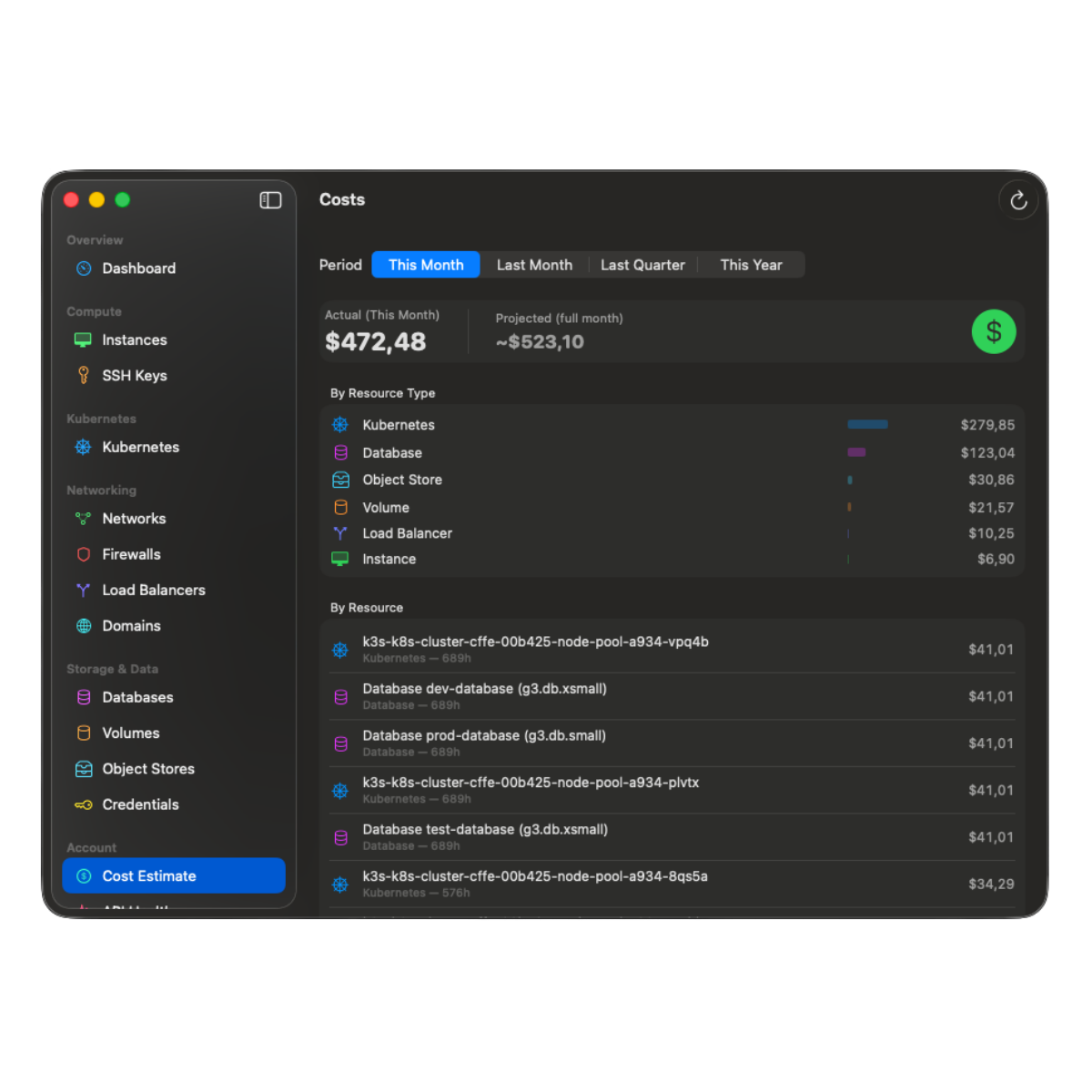
What the cost dashboard delivers.
-
Real charges, not estimates.
Numbers come from the Civo charges API, the same source that produces your invoice. No price-list multiplication, no client-side guessing.
-
Period picker with projection.
This month (with projected total), last month, last quarter, this year. Switching periods is one click; data for past months is cached locally so the next view is instant.
-
Per-resource-type breakdown.
Charges grouped by Compute, Kubernetes, Volumes, Object Stores, Databases, Load Balancers, Network. Each group expands to individual resources.
-
Rate editor.
Override hourly rates per resource type if your account has negotiated pricing. Overrides persist locally and apply to every period view.
-
Month-end projection.
Linear extrapolation from current month-to-date over remaining days. Gives you a defensible "what will this month cost" answer without waiting.
-
Past months cached locally.
Historical charges are persisted in a local cache so opening a six-month-old period does not re-hit the API. Cache is bound to the active region and Civo account.
Catch runaway resources before the invoice.
A misconfigured ReplicaSet that spins up 12 high-RAM pods every hour can burn three-digit Euros before the browser dashboard updates. CivoCloudManager rebuilds the month-to-date number every time you open the cost view; if your projected month-end suddenly doubles, you know in seconds, not at month close.
Past invoices in one click.
The cost view links straight to your past invoices on the Civo dashboard for download. No tab-hunting, no re-login. The app reads its own charges API for the live numbers and defers to Civo's billing portal for the legal documents.
Deep dives
Targeted reads for each Civo product.
Every Civo surface CivoCloudManager touches has its own page with the specifics, the trade-offs, and the architecture details. Pick the one closest to what you do today.
- 01 Civo CLI alternative for Mac Where the GUI beats the CLI, where it does not, and how the two coexist.
- 02 Civo Kubernetes GUI for Mac Live cluster dashboard, real-time pod logs, no kubectl required.
- 03 Civo Object Storage browser for Mac Native S3-compatible browser. Pause idle buckets to a central vault.
- 04 Civo firewall from the Mac menu bar One-click open/close per firewall, auto-IP detection, auto-close timer.
Guides
Step by step, and honest comparisons.
- 01 Connect your Civo API key Generate the key in the Civo dashboard, paste it once, and let the macOS Keychain hold it from then on.
- 02 Open a firewall for your IP The manual procedure, the dynamic-IP trap it leaves behind, and a free menu-bar path that closes the rule on a deadline.
- 03 vs Lens, OpenLens and k9s Three cluster agnostic tools, one Civo specific one. The difference decides which you want open.
- 04 Civo Object Storage over S3 The regional endpoint, working configuration for s3cmd, rclone and the AWS CLI, and what a native client does differently.
- 05 Civo DNS on Mac Point a domain at Civo's nameservers, then keep the zone in a native app instead of a browser tab.
- 06 Changelog Every shipped release, newest first, with the detail a store release note is too short to carry.
See real Civo costs from your Mac.
A one-time purchase on the Mac App Store. Family Sharing on.