
Civo firewall from the Mac menu bar.
Open and close firewalls with one click. Auto-IP, presets, auto-close timer.
Toggling a Civo firewall through the browser dashboard costs you six clicks, an MFA code, and a context switch every time. CivoCloudManager replaces that loop with a single shield icon in the menu bar. Click to open a firewall for your current public IP. Click again to close it. Auto-close timers, IP presets, and bulk Open All / Close All ship in the free tier, no purchase required.
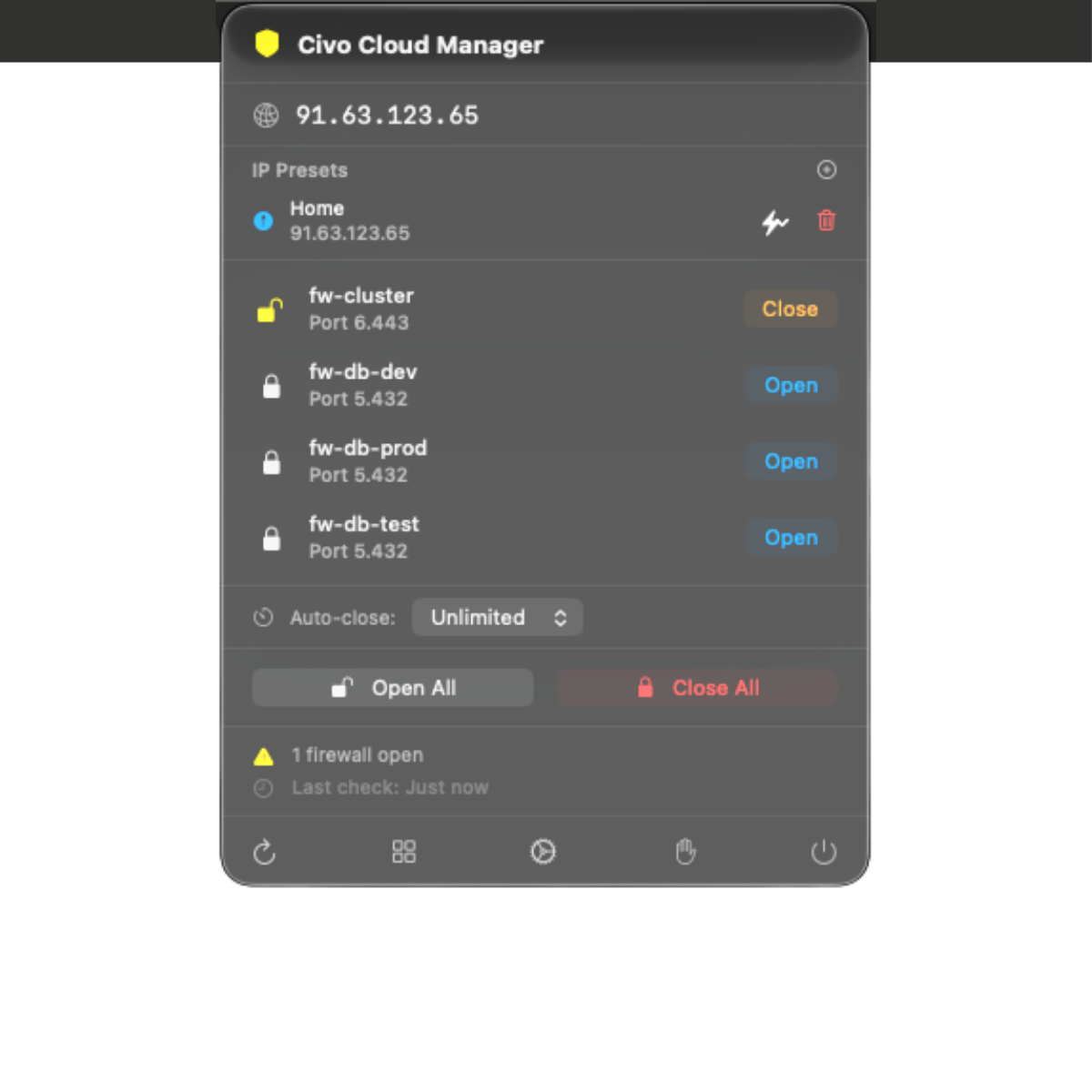
What the menu-bar firewall delivers.
-
One-click open and close.
Each managed firewall has Open and Close buttons in the popover. The app creates or removes a single rule for your current public IP on the port you configured. No browser, no MFA loop.
-
Auto-IP detection with three providers.
Your public IPv4 is detected via ipify.org with ifconfig.me and icanhazip.com as fallbacks. If one provider is down, the next handles it.
-
IP presets, Home, Office, anywhere else.
Save named IPs and pick from a dropdown when you want to open a firewall for a static location instead of your current public IP.
-
Auto-close timer.
Pick 15 minutes, 30 minutes, one hour, two hours, or no timer. The app removes the rule automatically when the timer fires, no orphan rules left behind.
-
Bulk Open All / Close All.
Toggle every managed firewall at once. The status indicator turns green when all rules are closed and yellow when at least one is open.
-
Status indicator in the menu bar.
Shield icon: green (all closed), yellow (at least one open for your IP), red (setup incomplete or token broken). Auto-refresh every 60 seconds.
Only manages rules it created.
Every rule the app creates is labelled civo-cloud-<hostname>-<firewall-name>. CivoCloudManager only touches rules with that label, rules created by Terraform, the Civo CLI, or another team member stay untouched. You can run the app alongside any existing firewall automation without risk of stomping on it.
Touch-ID-gated destructive actions.
Bulk Close All and individual rule deletion sit behind a Touch ID prompt (or system password fallback). Accidental clicks cannot drop your production access. The API key itself lives in macOS Keychain with hardware-backed encryption, it is never logged, never sent to any server other than api.civo.com.
Deep dives
Targeted reads for each Civo product.
Every Civo surface CivoCloudManager touches has its own page with the specifics, the trade-offs, and the architecture details. Pick the one closest to what you do today.
- 01 Civo CLI alternative for Mac Where the GUI beats the CLI, where it does not, and how the two coexist.
- 02 Civo Kubernetes GUI for Mac Live cluster dashboard, real-time pod logs, no kubectl required.
- 03 Civo Object Storage browser for Mac Native S3-compatible browser. Pause idle buckets to a central vault.
- 04 Civo cost dashboard for Mac Real charges from the Civo charges API. Period picker and month-end projection.
Guides
Step by step, and honest comparisons.
- 01 Connect your Civo API key Generate the key in the Civo dashboard, paste it once, and let the macOS Keychain hold it from then on.
- 02 Open a firewall for your IP The manual procedure, the dynamic-IP trap it leaves behind, and a free menu-bar path that closes the rule on a deadline.
- 03 vs Lens, OpenLens and k9s Three cluster agnostic tools, one Civo specific one. The difference decides which you want open.
- 04 Civo Object Storage over S3 The regional endpoint, working configuration for s3cmd, rclone and the AWS CLI, and what a native client does differently.
- 05 Civo DNS on Mac Point a domain at Civo's nameservers, then keep the zone in a native app instead of a browser tab.
- 06 Changelog Every shipped release, newest first, with the detail a store release note is too short to carry.
Get the menu-bar firewall, free.
Menu-bar tier free forever. Full dashboard is a one-time purchase on the Mac App Store.