
macOS 15+ · Mac App Store · zero dependencies
Civo Cloud Manager for Mac.
One click in the menu bar.
CivoCloudManager runs Civo Cloud from your Mac menu bar. Open a firewall for your current IP with one click. Drill into a Kubernetes cluster with live metrics and pod logs. Browse Object Stores over S3. All from a native macOS window, no browser, no kubectl, no MFA loop.
Requires macOS 15 (Sequoia) or newer.
7 days of full access, free, no card and no subscription. After that the menu-bar firewall stays free forever.
Free menu-bar firewall, one-time purchase for the full dashboard. Family Sharing on.
Source available on GitHub - read the code before you install.
The problem every Civo user knows
MFA codes, browser tabs, and a kubectl context for every cluster.
-
MFA codes for every firewall toggle
Need to open port 22 to one instance for ten minutes? Phone out, code in, browser open, dashboard loaded, rule edited. Then reverse the whole loop to close it.
-
Browser tabs for every cluster
Three clusters, three browser tabs, three reloads. Quota numbers somewhere, pod logs nowhere obvious. The dashboard is fine for one cluster, painful at three.
-
kubectl context marathon
Per-cluster kubeconfig downloads, port-6443 firewall rules, certificate renewals. The CLI works, but the warm-up is half the job.
-
Object Stores you forgot you had
Old buckets that cost you money every month because clicking through to delete them takes ten minutes and a delete-confirmation typed by hand.
-
Cost dashboards that lag a day
By the time the browser dashboard catches up, the runaway pod has already burned through €40. You want the number now, not tomorrow.
How CivoCloudManager solves it
Connect once. Manage from the menu bar.
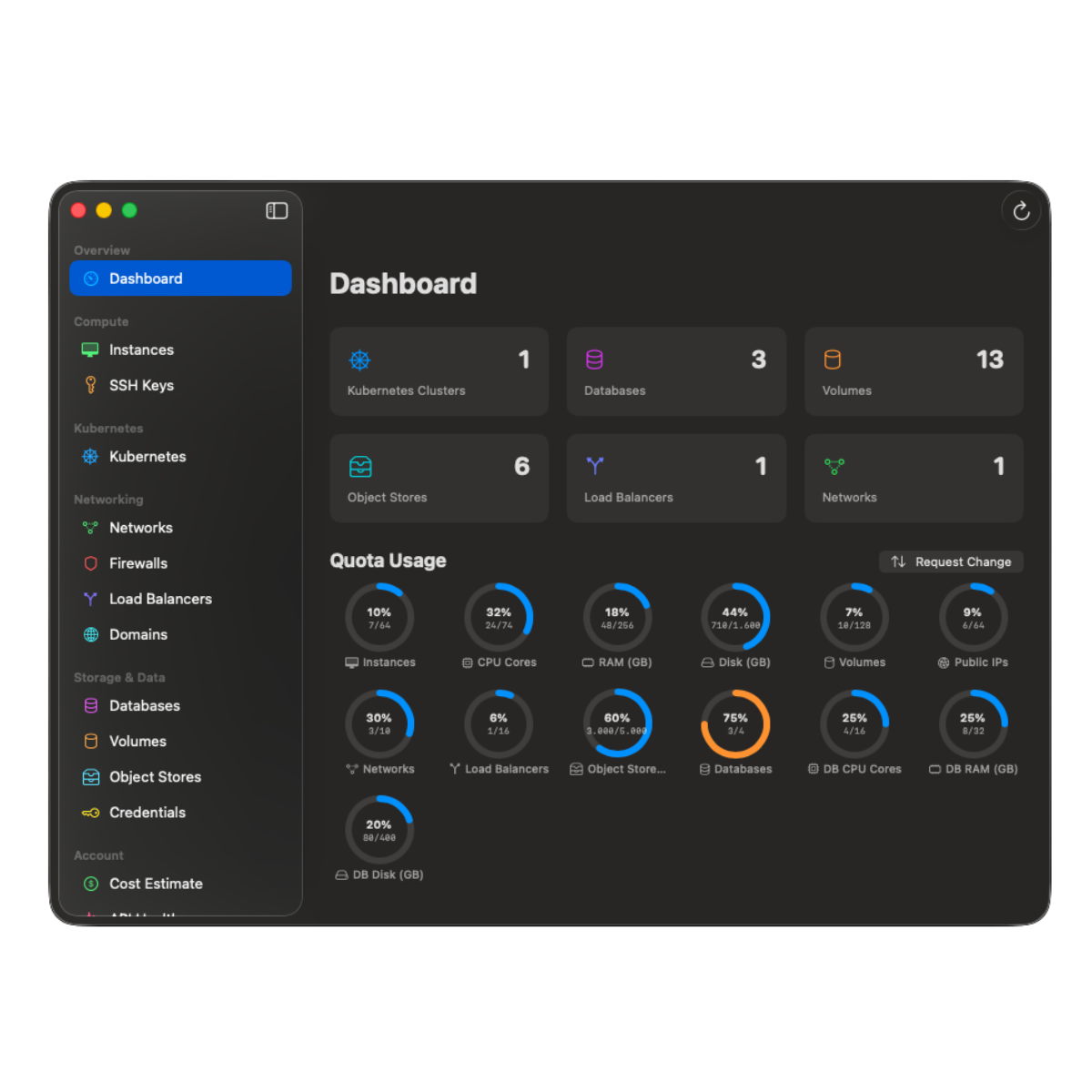
Drop your Civo API key in once, it lives in macOS Keychain with hardware-backed encryption. The shield in your menu bar turns yellow when a firewall is open for your IP. Click the dashboard for full Kubernetes, S3, costs and quotas. Touch ID gates the destructive bits.
CivoCloudManager is a native macOS app that manages a complete Civo Cloud account from the Mac menu bar and a dashboard window. It is built by Marcel R. G. Berger, published by DigitalFreedom Global LLC and distributed on the Mac App Store, and it talks to the Civo REST API v2 with an API key you store once in the macOS Keychain. It covers nine Civo surfaces: Kubernetes, Compute, Firewalls, Object Storage, Databases, Networks, Load Balancers, DNS and the charges API.
- 1
Connect
Paste your Civo API key once. It is stored in macOS Keychain, never in plaintext, never sent anywhere except api.civo.com.
- 2
Click
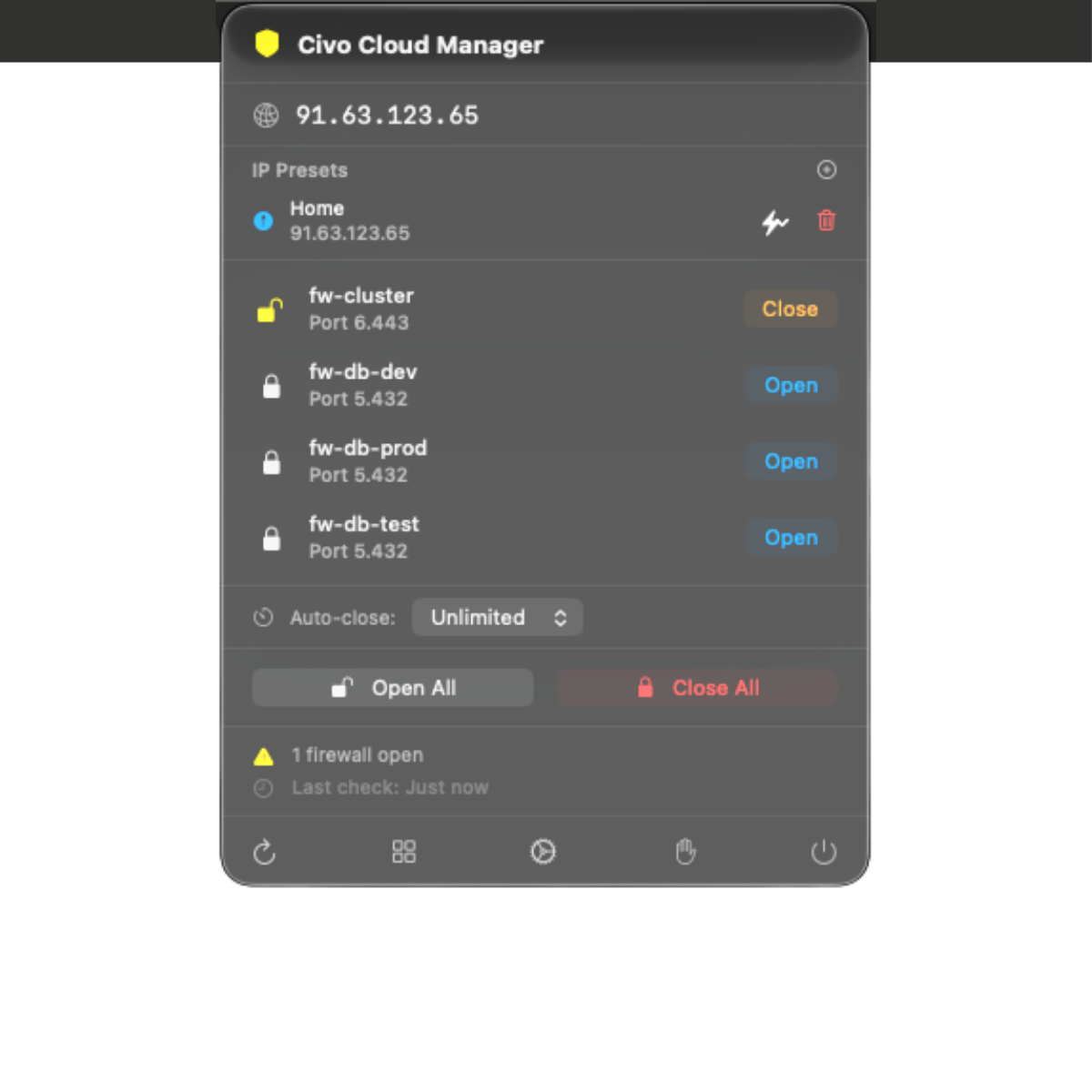
Open or close any firewall for your current IP from the menu bar. Bulk Open All / Close All. Auto-close timers from 15 minutes to two hours.
- 3
Inspect
Open the dashboard for live Kubernetes metrics, real-time pod logs, the S3 file browser, and actual cost numbers pulled from the Civo charges API.
Features
Every Civo resource, in one native window.
01 / 06
Live Kubernetes dashboard
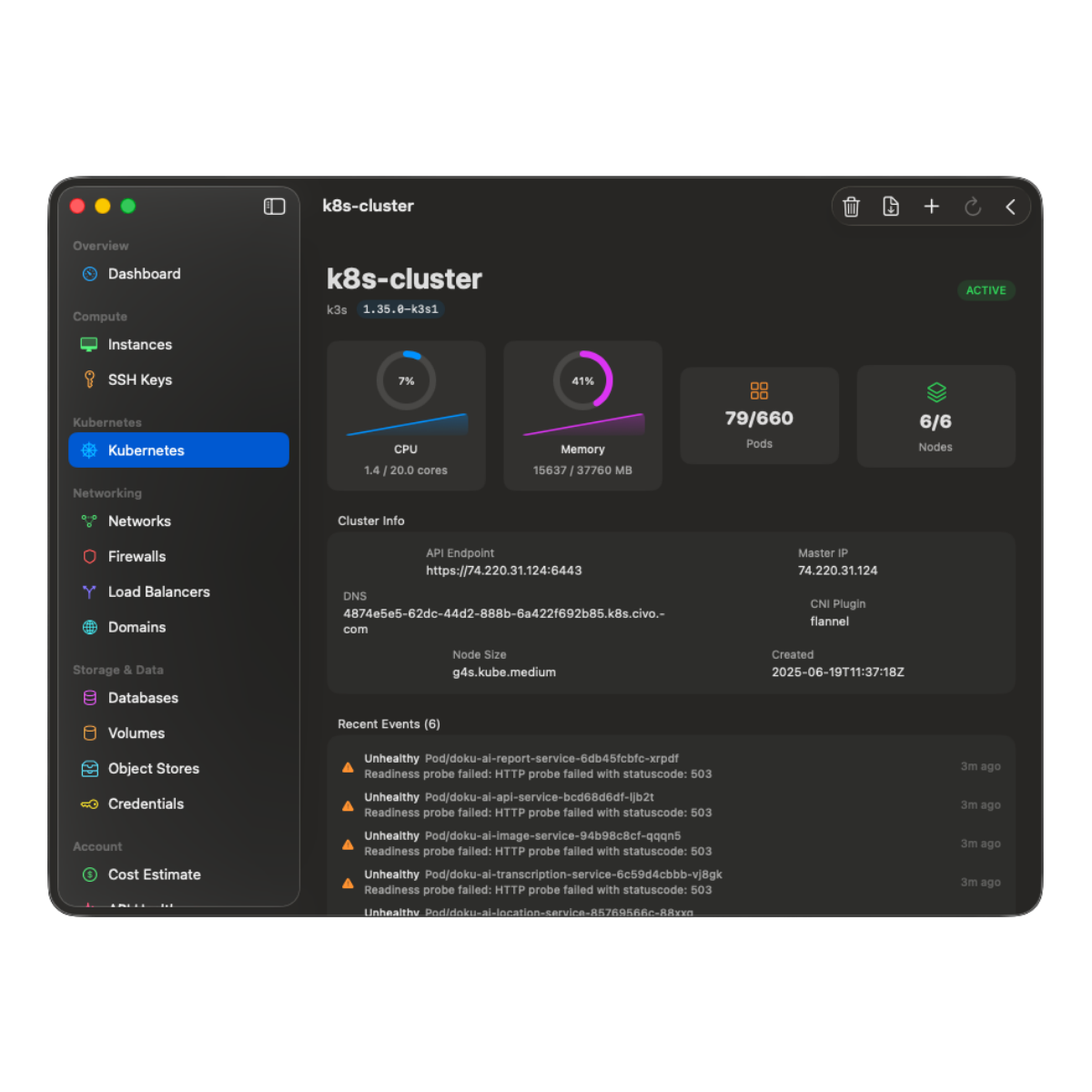
Direct Kubernetes API access over client-certificate mTLS, no kubectl needed. CPU and memory gauges with sparkline history, real-time pod logs, one-off commands run as a short-lived Job, deployment scaling, namespace filter, ConfigMap and Secret viewer. Port 6443 opens for your IP on connect and closes when you leave.
02 / 06
Menu-bar firewall
One-click open or close per firewall, scoped to your current public IPv4. Auto-detection with three fallback providers. IP presets for Home and Office. Bulk Open All / Close All. Auto-close timers. Touch-ID-gated destructive actions.
03 / 06
Object Store Pause & Resume
Archive an idle Object Store to a central vault and delete the original to stop paying for it. Resume later, the store is recreated with the same name and credentials, every file restored. The vault auto-resizes; transfers run four files in parallel; verify-before-delete is on by default.
04 / 06
S3 file browser, native
ListObjects v2 and Get, implemented in Swift with AWS Signature V4 via CryptoKit. No AWS SDK, no Electron wrapper. Download single files, multi-selections, or whole folders recursively. Access keys stay Touch-ID-gated.
05 / 06
Real cost dashboard
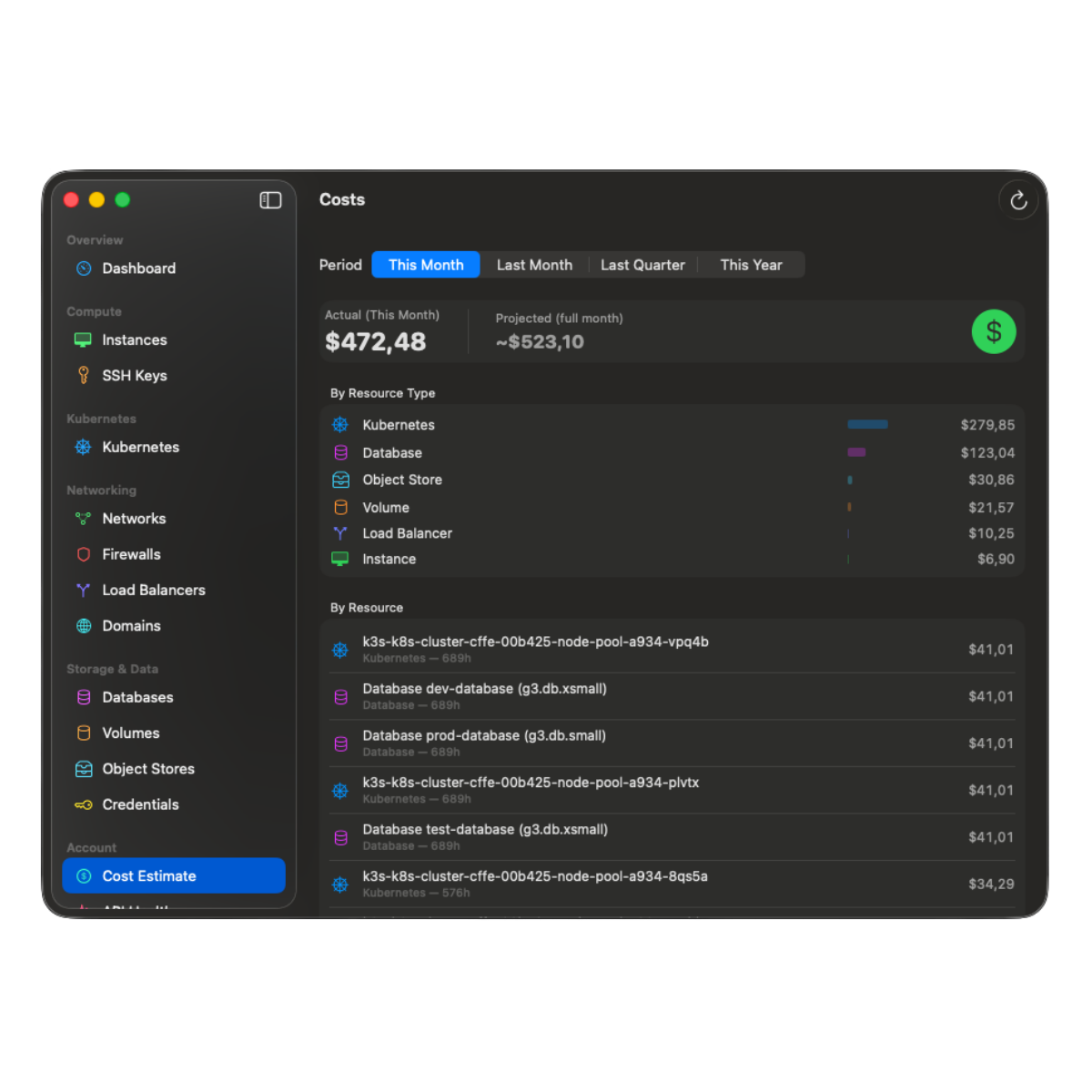
Actual charges from the Civo charges API, not estimates. Period picker (This Month + projected, Last Month, Last Quarter, This Year). Breakdown by resource type. Rate Editor for custom hourly rates. Past months cached locally.
06 / 06
API Health Monitor
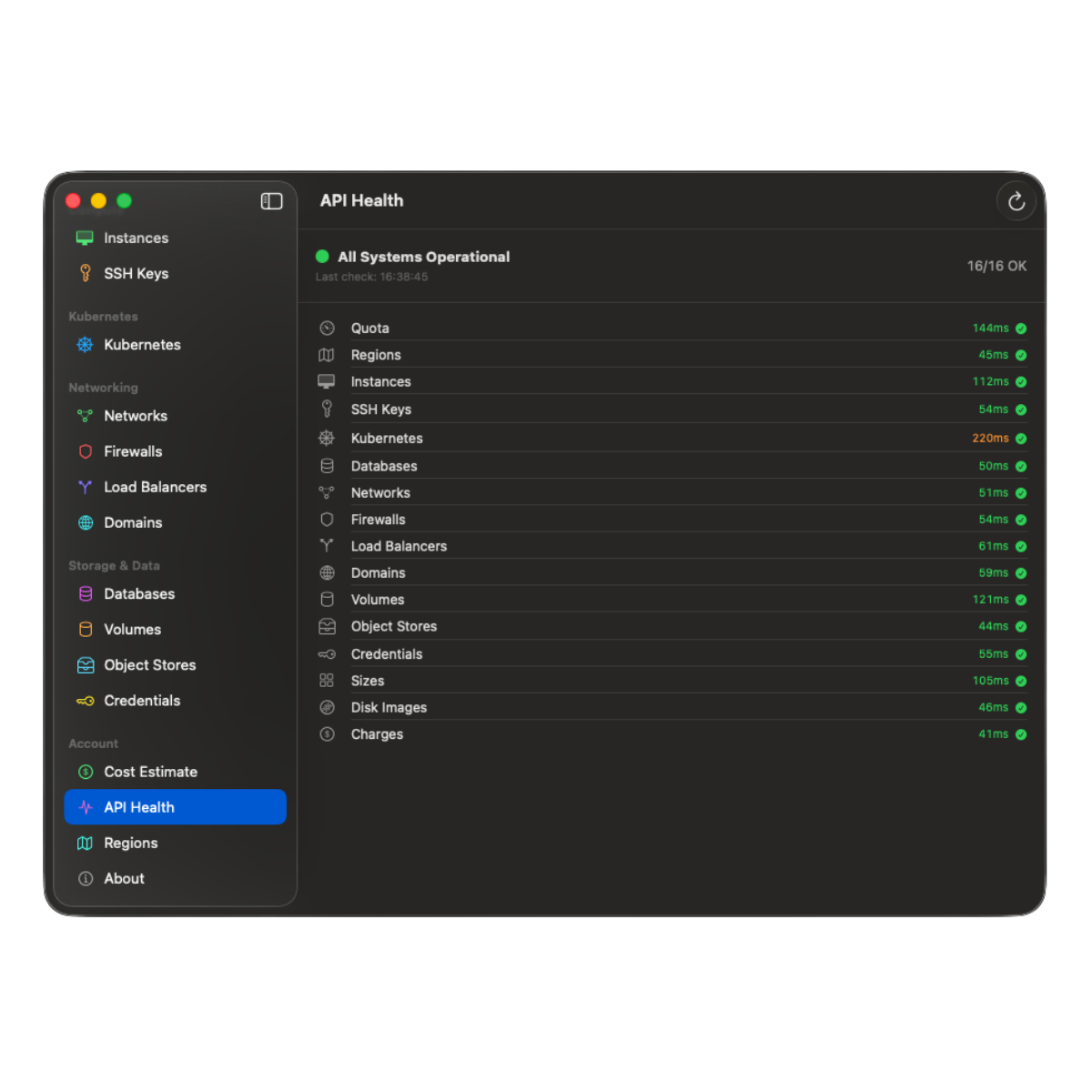
Tests all 16 Civo API endpoints with response time. Green under 200 ms, orange under 500 ms, red beyond. Color-coded animated checks, useful when something feels slow and you need to know whether it is you or them.
What every install gets
A complete Civo control surface, native to macOS.
- 01 Menu-bar firewall with auto-IP detection
- 02 Kubernetes live metrics, pod logs, one-off commands
- 03 S3 file browser with native SigV4 signing
- 04 Object Store Pause/Resume with central vault
- 05 Real costs from the Civo charges API
- 06 Quota gauges with 70 % and 90 % warnings
- 07 Full CRUD for instances, databases, networks, DNS
- 08 Touch-ID-protected credentials in macOS Keychain
- 09 Cmd-K search across every resource
- 10 JSON export with automatic secret redaction
Built for
Developers, DevOps engineers, and indie operators on Civo.
- 01 Developers shipping side projects on Civo
- 02 DevOps engineers managing multi-region clusters
- 03 Site Reliability Engineers chasing pod-restart alerts
- 04 Indie founders running production on a few instances
- 05 Agencies onboarding clients to Civo Kubernetes
- 06 Consultants who want a fast read-only audit view
- 07 Anyone tired of the browser dashboard MFA loop
- 08 Teams that ban random tray apps from random vendors
Zero third-party SDKs
Apple frameworks only, SwiftUI, CryptoKit, Security, LocalAuthentication. No telemetry, no analytics, no crash reporter.
Touch ID + Keychain
Your Civo API key lives in macOS Keychain with hardware-backed encryption. Touch ID gates credential reveal and destructive actions.
App Sandbox
Four entitlements, no more: sandbox, network client, user-selected files, app-scoped bookmarks. No location, camera, microphone, contacts, photos, or tracking identifier.
Built for Civo Cloud
Independent native macOS client for the Civo Cloud platform (civo.com). Not affiliated with Civo Ltd.; "Civo" is a trademark of Civo Ltd.
FAQ
Common questions
- Is there a free trial?
- Yes. Every install gets 7 days of full access from first launch, with no card and no subscription. The 7 days run as one continuous period, including time the app is closed. After they expire, menu-bar firewall management stays free forever, and the full dashboard needs the one-time Full Access purchase.
- Does CivoCloudManager replace the Civo CLI?
- For everyday cloud-management tasks, yes. The app talks to the Civo REST API v2 directly. Power users may still prefer the CLI for scripted workflows; the two coexist fine.
- Do I need kubectl installed?
- No. The app connects to your cluster's Kubernetes API directly over client-certificate mTLS, built with Apple's Security framework. You can still export the kubeconfig from the app if you want kubectl alongside it.
- Is my Civo API key sent anywhere?
- No. The key is stored in macOS Keychain on your device and used only in HTTPS requests to
api.civo.com. There is no publisher server in the loop. - Which macOS versions are supported?
- macOS 15 (Sequoia) and newer. The app is ready for macOS 26 (Tahoe) and uses SwiftUI throughout.
- Is there a Linux or Windows version?
- No. CivoCloudManager is a native macOS app and uses Apple frameworks (CryptoKit, Security, LocalAuthentication). A cross-platform port is not planned.
- How does Object Store Pause work?
- Pause copies every file from an Object Store into a central civo-cloud-manager vault, verifies keys and sizes, then deletes the original. Resume recreates the store with the same name and credentials and restores every file. The vault auto-resizes.
- Does Family Sharing apply to the Full Access purchase?
- Yes. The full-access purchase is Non-Consumable with Family Sharing enabled, one purchase covers everyone in your household.
- Can I read the source code?
- Yes. The full source is published and readable on GitHub at github.com/marcelrgberger/civo-cloud-manager. It is source-available, not an open-source license, distribution stays exclusive to the Mac App Store.
- How often is the app updated?
- Active development with regular releases through the Mac App Store. The store listing always carries the authoritative version number and release notes, and the full source history is public on GitHub.
Deep dives
Targeted reads for each Civo product.
Every Civo surface CivoCloudManager touches has its own page with the specifics, the trade-offs, and the architecture details. Pick the one closest to what you do today.
- 01 Civo CLI alternative for Mac Where the GUI beats the CLI, where it does not, and how the two coexist.
- 02 Civo Kubernetes GUI for Mac Live cluster dashboard, real-time pod logs, no kubectl required.
- 03 Civo Object Storage browser for Mac Native S3-compatible browser. Pause idle buckets to a central vault.
- 04 Civo firewall from the Mac menu bar One-click open/close per firewall, auto-IP detection, auto-close timer.
- 05 Civo cost dashboard for Mac Real charges from the Civo charges API. Period picker and month-end projection.
Guides
Step by step, and honest comparisons.
- 01 Connect your Civo API key Generate the key in the Civo dashboard, paste it once, and let the macOS Keychain hold it from then on.
- 02 Open a firewall for your IP The manual procedure, the dynamic-IP trap it leaves behind, and a free menu-bar path that closes the rule on a deadline.
- 03 vs Lens, OpenLens and k9s Three cluster agnostic tools, one Civo specific one. The difference decides which you want open.
- 04 Civo Object Storage over S3 The regional endpoint, working configuration for s3cmd, rclone and the AWS CLI, and what a native client does differently.
- 05 Civo DNS on Mac Point a domain at Civo's nameservers, then keep the zone in a native app instead of a browser tab.
- 06 Changelog Every shipped release, newest first, with the detail a store release note is too short to carry.
Built for Civo Cloud
Use CivoCloudManager alongside the official Civo tools.
CivoCloudManager controls your Civo account through the public Civo REST API. The products below come from Civo Ltd., this app is an independent native macOS client for them.
- 01 Civo Kubernetes, managed K3s Cluster creation, scaling, kubeconfig, all surfaces the app drives directly.
- 02 Civo Compute, Instances Hourly-priced VMs, start, stop, reboot, resize, SSH-key management.
- 03 Civo Databases Managed PostgreSQL and MySQL with Touch-ID-gated credential reveal.
- 04 Civo Object Storage S3-compatible buckets, the app ships a native SigV4 file browser.
- 05 Civo CLI (official) Civo's first-party command-line interface, open source and scriptable.
- 06 Civo Documentation Official docs for every Civo product, including the REST API reference.

Stop opening twelve tabs to manage your cloud.
Download CivoCloudManager on the Mac App Store. First firewall opened in under a minute.
Requires macOS 15 (Sequoia) or newer.
Menu-bar firewall free. Full dashboard is a one-time purchase.